
共模扼流圈中阻抗与电抗的关系
对于共模扼流圈(CMC),部分分销商和厂商会给出特定频率下的阻抗(Z),而另一些则会给出共模电感值。
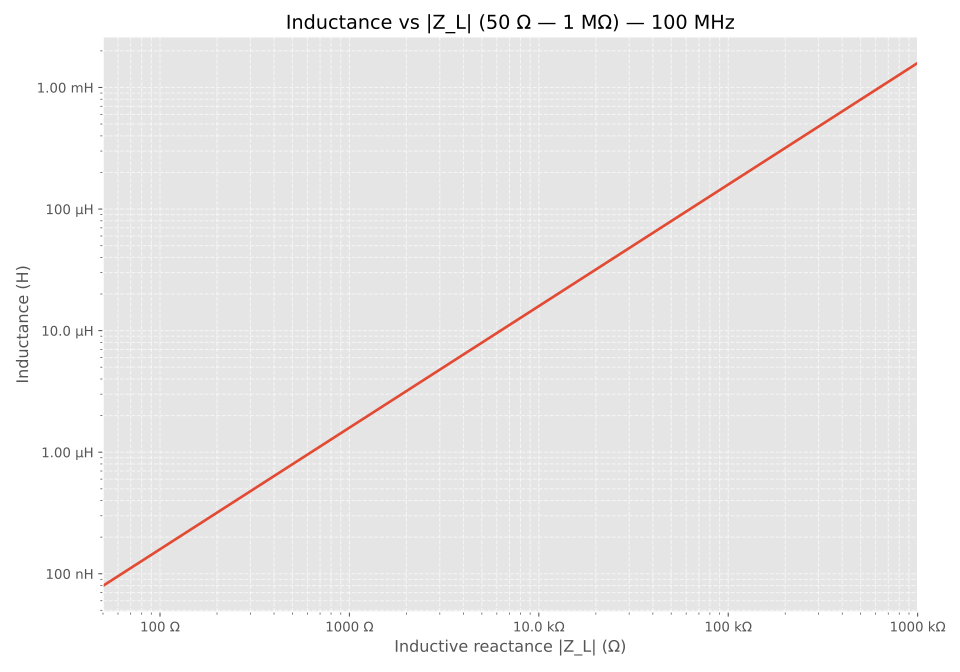
为了便于比较这些数值,我们制作了下面的图表,方便你在不同频率下进行阻抗与电感之间的换算。
公式
由电感计算感抗的公式为:
\[ |Z_L| = 2 \pi f L \]其中:
- $|Z_L|$ 为感抗,单位为欧姆(Ω)
- $f$ 为频率,单位为赫兹(Hz)
- $L$ 为电感,单位为亨利(H)
反过来,由感抗计算电感:
\[ L = \frac{|Z_L|}{2 \pi f} \]使用 UliEngineering(Python)计算电感或电抗
下面是两个可直接运行的小示例——一个由电抗计算电感,另一个由电感计算电抗。它们的行为与上面的 larmor 示例类似。
reactance_example.py
from UliEngineering.Electronics.Reactance import inductance_from_reactance

print(inductance_from_reactance(1000, "100 kHz"))  # 100 kHz 下电抗 1000 Ω -> 打印 L(单位为亨利)

# 由频率下的电感 L 计算感抗 |Z_L|
from UliEngineering.Electronics.Reactance import reactance_from_inductance

print(reactance_from_inductance(1e-6, "100 kHz")) # 100 kHz 下 L = 1 µH -> 打印 |Z_L|(单位为欧姆)生成图表的脚本
impedance_inductance_plot.py
# 绘制 100 MHz 下电感与感抗(Z_L)的关系图 —— 单个对数-对数图
# 电抗范围:50 Ω -> 1 MΩ(对数间隔)

import numpy as np
import matplotlib.pyplot as plt
from matplotlib.ticker import FuncFormatter, LogLocator

# UliEngineering 导入(假定按需可用)
from UliEngineering.EngineerIO import format_value
from UliEngineering.Electronics.Reactance import (
    inductance_from_reactance,
)

# 从 50 到 1e6 的对数间隔电抗
zs = np.logspace(np.log10(50), np.log10(1_000_000), 1000)

# 在 100 MHz 下计算电感(单位为亨利)
L = inductance_from_reactance(zs, "100 MHz")

plt.style.use("ggplot")
fig, ax = plt.subplots(figsize=(10, 7))

# 对数-对数图
ax.plot(zs, L, color="C0", lw=2)
ax.set_xscale('log')
ax.set_yscale('log')
ax.set_xlim(50, 1_000_000)
ax.set_xlabel('Inductive reactance |Z_L| (Ω)')
ax.set_ylabel('Inductance (H)')
ax.set_title('Inductance vs |Z_L| (50 Ω — 1 MΩ) — 100 MHz')
ax.grid(which='both', alpha=0.6, linestyle='--')

# 使用对数定位器以获得整洁的刻度布局
ax.xaxis.set_major_locator(LogLocator(numticks=10))
ax.yaxis.set_major_locator(LogLocator(numticks=10))

# 使用 format_value 格式化刻度以获得美观的单位
ax.xaxis.set_major_formatter(FuncFormatter(lambda x, pos: format_value(x, 'Ω')))
ax.yaxis.set_major_formatter(FuncFormatter(lambda y, pos: format_value(y, 'H')))

ax.minorticks_on()
plt.tight_layout()
plt.show()Check out similar posts by category:
Electronics
If this post helped you, please consider buying me a coffee or donating via PayPal to support research & publishing of new posts on TechOverflow