
如何使用 Logfire 配合 OpenObserve 后端
在我们之前的文章 Logfire 示例:连接到 SigNoz 而不是 Logfire 中,我们展示了如何使用 Logfire 配合 SigNoz 作为后端。在本文中,我们将演示如何配置 Logfire 将日志发送到 OpenObserve 后端。
请参阅 OpenObserve 5 分钟 Docker + Traefik 搭建 了解我们推荐的 OpenObserve 搭建方式。
首先,访问 https://openobserve.mydomain.com/web/ingestion/recommended/traces?org_identifier=default 来为 OpenObserve 配置 OTLP。
你需要 HTTP Endpoint: 和 Authorization: 头。
以下是将日志从 Logfire 发送到 OpenObserve 的完整示例代码:
test-openobserve.py
#!/usr/bin/env python3
import os
import logfire

# 配置环境变量
os.environ['OTEL_EXPORTER_OTLP_ENDPOINT'] = 'https://openobserve.mydomain.com/api/default' # 在此处插入 OpenObserve 的 "HTTP Endpoint"
os.environ['OTEL_EXPORTER_OTLP_HEADERS'] = 'Authorization=Basic W280PMn2Y6rnxZURbS1XEQONEZ0GtKpErE6A+sae' # 在此处插入 "Authorization" 头

# 配置 Logfire
logfire.configure(
    service_name='order-processing-service',
    send_to_logfire=False,
)

# 带有嵌套 span 的示例函数
def process_order(order_id: str, user_id: str):
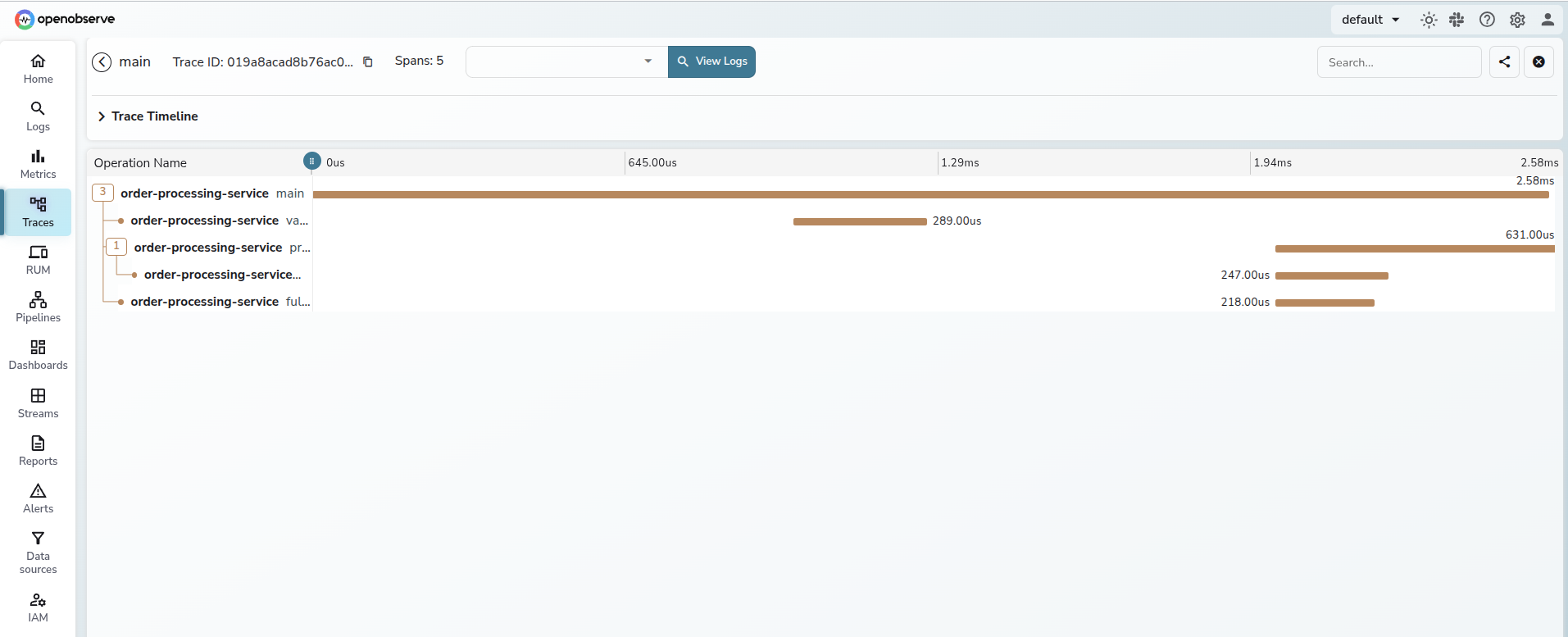
    with logfire.span('validate_order'):
        # 模拟验证
        print(f"Validating order {order_id} for user {user_id}")

    with logfire.span('process_payment'):
        # 模拟支付处理
        print(f"Processing payment for order {order_id}")

        with logfire.span('call_payment_gateway'):
            # 嵌套 span 示例
            print("Calling payment gateway API")

    with logfire.span('fulfill_order'):
        # 模拟订单履行
        print(f"Fulfilling order {order_id}")

# 主执行
if __name__ == '__main__':
    with logfire.span('main'):
process_order('12345', 'user-67890')这是在 OpenObserve 中的显示效果(左侧菜单中的 Traces,然后点击右上角的 Run Query,再点击 trace 查看详情):
Check out similar posts by category:
Monitoring, Python
If this post helped you, please consider buying me a coffee or donating via PayPal to support research & publishing of new posts on TechOverflow