
如何在 PlatformIO 上使用 Adafruit LittlevGL Glue Library 的自定义 LVGL lv_conf.h
如果你像我们在 LVGL 示例中那样使用 PlatformIO 和 Adafruit LittlevGL Glue Library(如 PlatformIO 的 Adafruit ST7735R 显示器最小 LVGL 示例),lv_conf.h 随 Adafruit LittlevGL Glue Library 一起提供,因此对 lv_conf.h 的任何更改都不是永久的,因为当 .pio 文件夹中的库重新安装时它们会被覆盖。
原始配置文件位于
original_lv_conf_path.txt
.pio/libdeps/esp32dev/Adafruit LittlevGL Glue Library/lv_conf.h(esp32dev 是你 platformio.ini 中的环境名称,因此在你的配置中可能不同)
如何创建自定义 lv_conf.h
幸运的是,PlatformIO 将项目的 include 目录配置为优先于其他文件夹,包括位于 .pio 中的库依赖项。
换句话说,你只需在项目的 include 目录中创建一个名为 lv_conf.h 的文件,PlatformIO 会为你处理其余的。
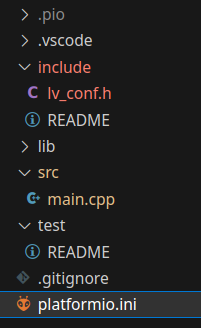
通常,只需从原始 lv_conf.h 复制内容开始,然后进行修改。
**此外,要抑制一些内部错误,**你需要在 platformio.ini 中添加以下 #define/编译器标志:
platformio_build_flags.ini
build_flags = -DLV_CONF_INCLUDE_SIMPLE -DLV_CONF_SUPPRESS_DEFINE_CHECKCheck out similar posts by category:
LVGL, PlatformIO
If this post helped you, please consider buying me a coffee or donating via PayPal to support research & publishing of new posts on TechOverflow