
Matlab/Simulink S-Function mit Vektor-Eingang & -Ausgang
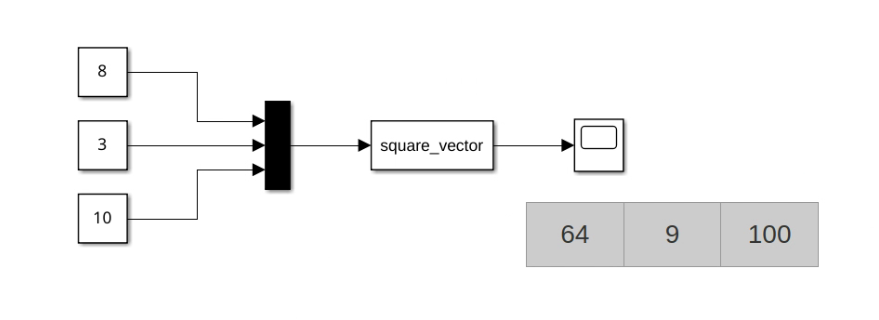
Das folgende S-Function-Beispiel demonstriert, wie man eine S-Function mit Vektor-Eingang und -Ausgang in Matlab/Simulink erstellt.
- Es akzeptiert einen 3-Vektor von realen Eingängen
- Es quadriert die Eingänge elementweise
- Es gibt einen 3-Vektor von realen Ausgängen aus
Im Allgemeinen, beim Schreiben von Vektor-I/O-S-Functions, beachten Sie, dass:
ssSetInputPortWidth(S, 0, n);oderssSetOutputPortWidth(S, 0, n);die Anzahl der Elemente im Vektor aufnsetzt. Sie müssen diese Funktion inmdlInitializeSizesaufrufen.- Eingabedaten werden nicht als kontinuierliches Array gegeben sondern als Array von Zeigern! Um es in einen Vektor umzuwandeln:
square_vector.cpp
InputRealPtrsType uPtrs = ssGetInputPortRealSignalPtrs(S, 0);
// ...
std::array<double, 3> input = { *uPtrs[0], *uPtrs[1], *uPtrs[2] };- Die Ausgabe wird als Zeiger auf einen kontinuierlichen Vektor gegeben
square_vector.cpp
square_vector_full.cpp
#define S_FUNCTION_NAME square_vector
#define S_FUNCTION_LEVEL 2

#include "simstruc.h"

// Function: mdlInitializeSizes ==============================================
static void mdlInitializeSizes(SimStruct *S) {
    ssSetNumSFcnParams(S, 0);  // No parameters

    if (!ssSetNumInputPorts(S, 1)) return;
    ssSetInputPortWidth(S, 0, 3);  // Single input
    ssSetInputPortDirectFeedThrough(S, 0, 1); // Direct feedthrough

    if (!ssSetNumOutputPorts(S, 1)) return;
    ssSetOutputPortWidth(S, 0, 3); // Single output

    ssSetNumSampleTimes(S, 1);
    ssSetOptions(S, 0);
}

// Function: mdlInitializeSampleTimes =========================================
static void mdlInitializeSampleTimes(SimStruct *S) {
    ssSetSampleTime(S, 0, INHERITED_SAMPLE_TIME);
    ssSetOffsetTime(S, 0, 0.0);
}

// Function: mdlOutputs ======================================================
static void mdlOutputs(SimStruct *S, int_T tid) {
    // Get input signal
    InputRealPtrsType uPtrs = ssGetInputPortRealSignalPtrs(S, 0);

    // Get output signal
    real_T *y = ssGetOutputPortRealSignal(S, 0);

    // Square the input
    y[0] = *uPtrs[0] * *uPtrs[0];
    y[1] = *uPtrs[1] * *uPtrs[1];
    y[2] = *uPtrs[2] * *uPtrs[2];
}

// Function: mdlTerminate ====================================================
static void mdlTerminate(SimStruct *S) {
    // No termination tasks required
}

#ifdef  MATLAB_MEX_FILE
#include "simulink.c"      // MEX-file interface mechanism
#else
#include "cg_sfun.h"       // Code generation registration function
#endifMakefile
Makefile
all:
	mex square_vector.cpp
Wie man in Simulink verwendet
Schritt-für-Schritt-Anleitung zum Hinzufügen der S-Function
Beispielverwendung:
Check out similar posts by category:
Matlab/Simulink
If this post helped you, please consider buying me a coffee or donating via PayPal to support research & publishing of new posts on TechOverflow